
Give every system a spine
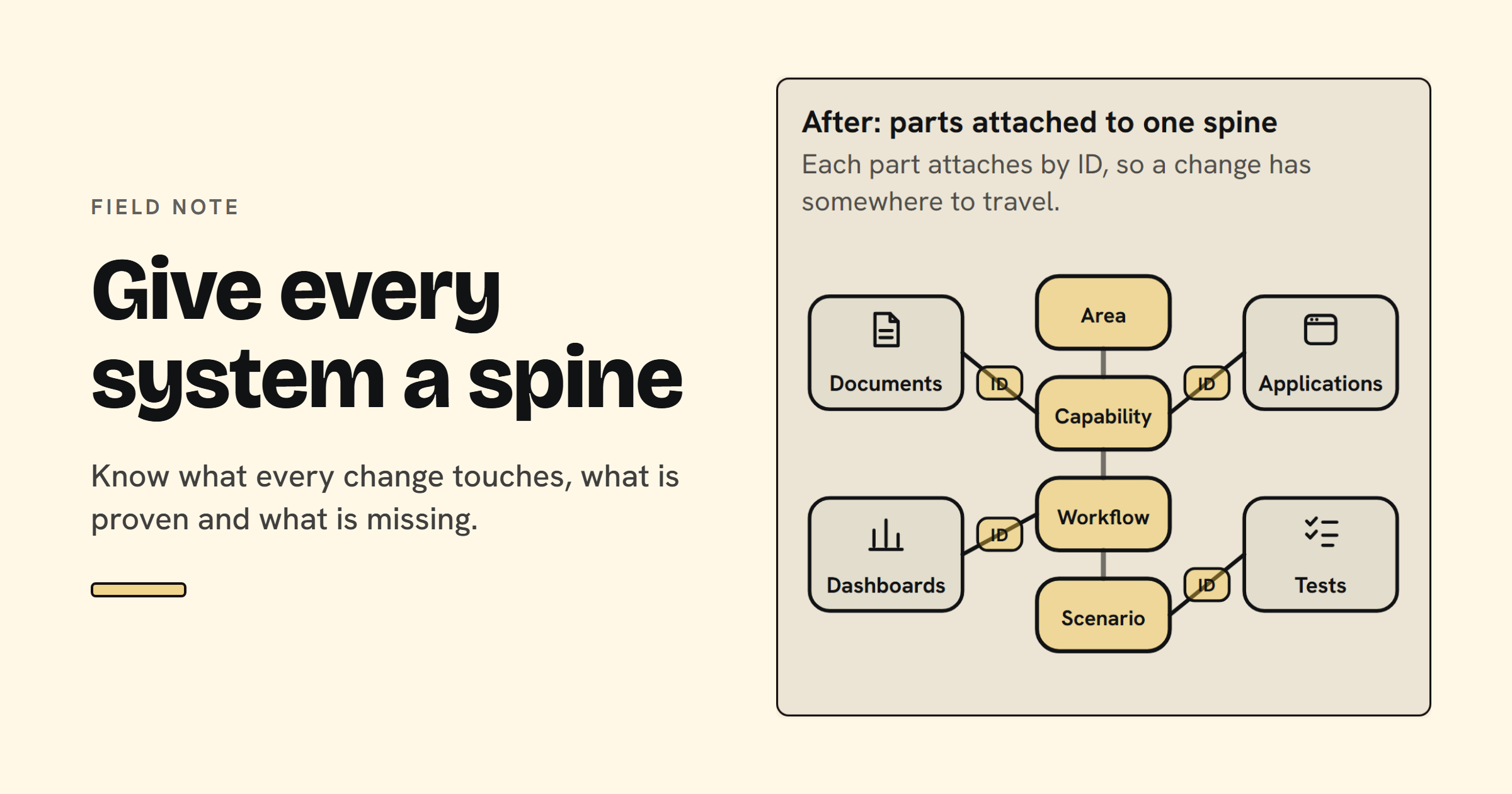
Most systems don't fail because one part breaks. They fail because nobody can say what a change just touched.
TL;DR
- A traceability spine is one shared structure (business area, capability, workflow and scenario) that every report, feature, integration and test attaches to by ID before it ships. It lets you say what a change touches, what is proven and what is missing, because evidence and change history hang on the same IDs.
- Impact, coverage and readiness stop being meetings and become lookups.
- Status comes from current evidence, so "ready" is calculated, not argued.
- A spreadsheet is enough to start. Structure comes first, then dashboards, automation and AI readiness work.
Why does a system without a spine cost so much?
Because every change becomes a guess. When nobody can say what a change touches, what is proven and what is missing, teams fill the gap with meetings, caution and luck. The cost shows up in familiar places, and almost none of it appears on a dashboard.
- Unknown blast radius. A column is renamed or a rule updated, and nobody knows which reports, screens or tests depended on it.
- Go-live decisions on opinion. Readiness is a feeling in a meeting, not a fact traced to evidence.
- Re-testing everything. Without knowing what changed, the safe move is to test it all again, or skip it and hope.
- Gaps found in production. A customer, vendor or auditor finds the untested exception path.
Most organizations already own the parts: dashboards, test cases, documents and applications. What they lack is the structure that connects them. One BI rebuild of reports that did not reconcile began from the same principle: foundation before surface.
What is a traceability spine made of?
A spine is a backbone of fixed levels with attachments, evidence and rules for change. The levels run from business area to capability, workflow and scenario, the same in every area. Every item has a stable ID and exactly one parent, so any piece of work can be found, linked and checked for proof.
Vertebrae give every item one place
In plain words: where the business works, what it can do, a job inside that, and one specific thing that must work, including what must happen when it goes wrong.
Name it before you build it. Ambiguous words create silent defects. "Post the payment" could mean money in or money out, approve or record, and each reading needs its own test. One term, one meaning, one owner.
Write what goes wrong. Exception paths usually outnumber the happy path, and they carry the risk. Write the failure scenarios as carefully as the success ones.
Ribs attach context by ID
Roles, business rules, data and systems, and risks attach to scenarios as ribs. Attach them by ID, not by prose: you can't query a paragraph, but you can query an ID. Links get their own table, one row per link, never "ERP, bank, tax" in one cell. That table is where impact analysis lives.
Nerves carry evidence up
Evidence flows up the spine as signals: test runs, reconciliation checks and verifications. Each records what was checked, the result, when, where, and a link to the proof. Status is a fact, not a feeling: passed, failed, not run, out of date or not written. Only passed counts.
Reflexes mark proof out of date
When a system or rule changes, the spine knows which scenarios touch it, marks their proof out of date, and knows who to tell. Green yesterday isn't green today if something it depends on has changed.
Health checks roll status up the backbone
Status rolls up from scenario to area. A parent is healthy only when every child is proven and current, so it is only as ready as its weakest child. Don't average a failure away.
Does the same spine fit BI, applications and engineered systems?
Yes. The levels and attachments stay the same; only the vocabulary changes. A BI team calls the top level a subject area, a product team calls it a product area, and a systems team calls it a system. Keeping one shape everywhere is what lets one question answer every area.
If Finance and Operations keep different shapes, you need two of every query. With the same columns, one question answers both. The examples below are generic and illustrative.
| Spine part | BI and analytics | Applications | Systems engineering |
|---|---|---|---|
| Area | Subject area (Finance) | Product area | System |
| Capability | Business process (Accounts payable) | Capability (Invoicing) | Function or requirement |
| Workflow | Report or semantic model area (AP aging) | User workflow (Approve an invoice) | Interface or operational process |
| Scenario | AP balance by vendor equals the source ledger at month end | An invoice over the limit needs a second approver | Verification case: the interface rejects a malformed message |
| Ribs | Source tables, measures, owners, refresh | Roles, screens, APIs, rules | Components, interfaces, hazards |
| Nerves | Reconciliation checks | Test runs | Verification results |
| Reflex | Schema change: which measures and reports are out of date | Code change: which journeys to re-test | Component change: which cases to re-verify |
How do you make new work conform to the spine?
Attach it before it ships. Conforming means every new report, feature, integration or test gets an ID and a parent in the spine before release, and isn't called done until it has scenarios, linked context and evidence. These habits make that routine.
- Name it. Settle the term, its meaning and its owner first.
- Give it an ID and one parent. Place it under an existing workflow, or add the workflow first.
- Write the scenarios. Include what must happen when it goes wrong.
- Attach roles, rules, systems and risks by ID. One row per link.
- Don't grade your own homework. Whoever built it shouldn't be the only one who proves it.
We use this structure across our own BI, application and data builds. The habits apply from the first screen of a new application as much as to a report.
How does a spine help you monitor and maintain a system?
Monitoring becomes a rollup, and maintenance becomes a lookup. Status rolls up the backbone from the latest evidence, so readiness is calculated rather than argued. Change impact runs the other way: a changed system points to the scenarios that touch it, their proof is marked out of date, and the owners are known.
Monitor with a readiness rollup
In the example below, one scenario failed and another has not been run, so the workflow, capability and area above them all read Not ready, with the reasons visible. The workflow whose scenarios all passed stays Ready. Nothing is averaged.
- AreaFinanceNot readyA workflow beneath it is not ready.
- CapabilityAccounts payableNot readyA workflow beneath it is not ready.
- WorkflowAP agingNot readyOne scenario failed and one has not been run.
- ScenarioAP balance by vendor equals the source ledger at month endPassed
- ScenarioA credit memo reduces the vendor balanceFailed
- ScenarioA reversed invoice leaves no orphan balanceNot run
- WorkflowVendor setupReady
- ScenarioA new vendor requires verified tax detailsPassed
- ScenarioA duplicate vendor record is rejectedPassed
Gaps are the point. A model that shows "no owner", "rule with no check" or "never tested" is doing its job. Those are the findings a status meeting rarely reaches.
Maintain with change impact
When a source system or rule changes, ask what it touches and whom to tell. In a spine that is one lookup through the link tables: the changed item leads to every attached scenario, in any area, and those scenarios read Out of date until proven again.
- AP balance by vendor equals the source ledger at month endOut of date
- An invoice over the limit needs a second approverNot touched
- Month-end accruals post to the right periodOut of date
- Inventory value ties to the ledgerOut of date
- A purchase order closes when goods arriveNot touched
- Finance reporting owner
- Inventory operations lead
- Integration owner
What does a starter spine look like?
A starter spine fits in a spreadsheet. It needs backbone tables, reference tables, link tables, a run log, a change log and a few derived views. Start with one area, one capability and a small set of scenarios, and extend it only when the questions demand it.
Structure comes before dashboards and automation: automating an unstructured base only repeats the noise on a schedule. If your model definitions already live in version control, the history your change log needs already exists.
Try it: a small Finance spine you can click
This one is interactive. It is a starter spine at its smallest: one area, three capabilities and eight scenarios, with every link held as a row. Click a scenario to see what it attaches to, record a run, or change a system and watch the rollup and the ripple update.
This spine is live. Click a scenario, record a run or change a system, and the answers update as you go.
- AreaFinanceNot ready
- APAccounts payableNot ready
- AP-01Invoice intakeNot ready
- AP-02Payment runNot ready
- ARAccounts receivableNot ready
- AR-01Cash applicationNot ready
- GLGeneral ledgerReady
- GL-01Bank reconciliationReady
Try it
Three things to try
- Click a scenario, such as AP-02.2, to see what it attaches to.
- Record a run with Passed or Failed, and watch readiness roll up to Finance.
- Change a system above to see what it touches and whom to tell.
What do people get wrong about traceability?
Most teams treat traceability as paperwork and then wonder why it drifts. A spine fails when it is filled in once, scored by averages, or built after the dashboard. Each mistake looks small and produces the same result: nobody trusts the status.
- Filling it in once. A matrix built for a review is a snapshot. A spine stays alive because evidence and changes keep attaching to the same IDs.
- Averaging a failure away. "Most scenarios passed" hides the one that matters. Only passed counts.
- Building the dashboard first. Without stable IDs and honest statuses, a dashboard reports noise with confidence.
Frequently Asked Questions
What is a traceability spine?
A traceability spine is one shared structure every piece of work attaches to by ID: area, capability, workflow and scenario, with roles, rules, systems and risks linked to scenarios. Evidence and changes attach to the same IDs, so you can see what a change touches and what is proven.
How is a traceability spine different from a requirements traceability matrix?
It is the same idea, kept alive. A requirements traceability matrix is often filled in once and left to drift. A spine keeps recording evidence, status and change impact, and its links are IDs in their own tables, so coverage and impact questions are lookups.
Do I need special software to build a spine?
No. A spreadsheet or the test-management tool you already use can hold the backbone, reference and link tables, and the run log. What matters is stable IDs, one term per meaning and clear status rules. Tools and automation help once that structure exists.
Where do I start?
Pick one business area, one capability and a small set of scenarios, including how each can go wrong. Give each an ID and a parent, attach roles, rules, systems and risks, and record the latest evidence. When the next change arrives, check whether the spine tells you what it touched.
How does this apply to BI and analytics?
The area is a subject area, the capability a business process, the workflow a report or model area, and the scenario a check, such as a balance matching its source at month end. Source tables, measures and owners attach as ribs, and reconciliation checks are the evidence.
If your systems have the parts but not the answers, we can help you build the spine.
About the author: William Rodriguez is the founder of Analytical Ants. He builds business intelligence, application and data systems, and writes about keeping them provable and maintainable. More about Analytical Ants.