
A Shelf of Old Gear, One Folder and an AI: Seven Listings in a Day
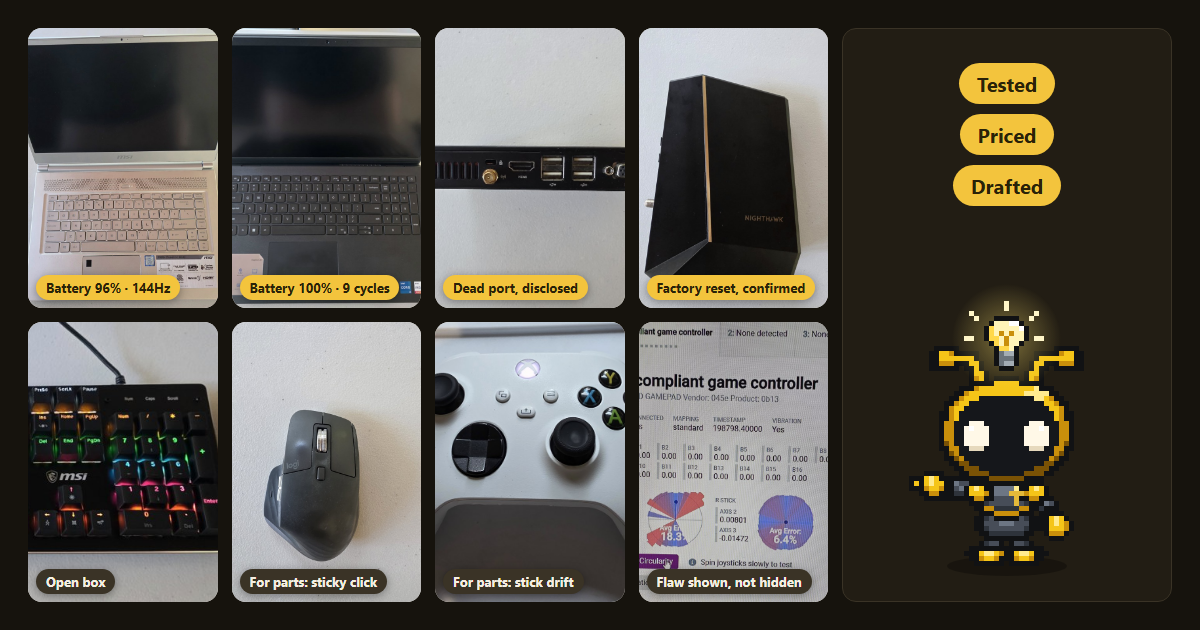
I had a shelf of old machines and gear, and a new piece of equipment to pay for. Selling it all had been on my list for months. With AI doing the tedious parts, it took a day.
TL;DR
- To sell old electronics with AI, put your photos and a plain notes file in one folder. Tell an AI agent how you want to sell. It researches what similar items actually sold for, checks each machine's real specs and condition, and drafts every listing your way. You keep the decisions, the passwords and the publish button.
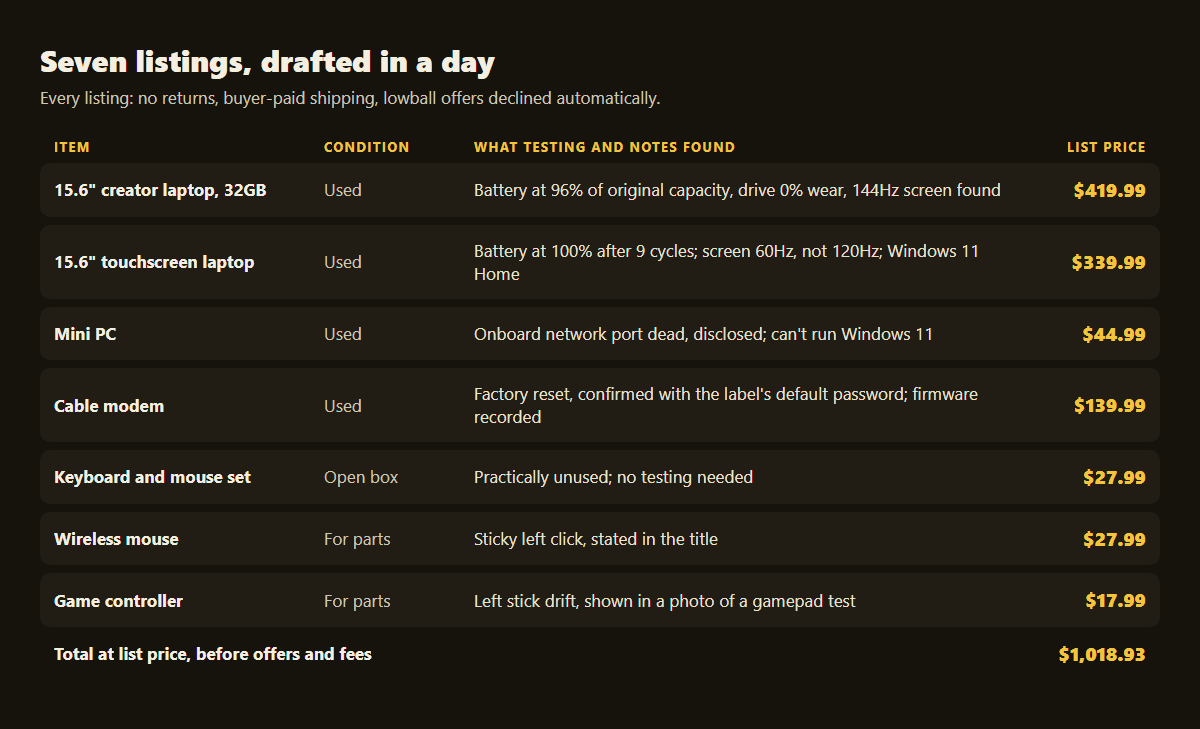
- Seven items went from photos to drafted eBay listings in a single day: two laptops, a mini PC, a cable modem, a keyboard-and-mouse set, a mouse and a game controller.
- Testing paid for itself. It found a selling point I had missed and corrected three wrong assumptions before a buyer could.
- Every sensitive step stayed with me: identity checks, passwords, remote access and wiping each machine before it ships.
Why does old gear sit in a closet for months?
Because each item is its own small project. Selling one used laptop well means looking up what it's worth, confirming its specs, checking the battery and drive, writing a title buyers will search for, describing every flaw and picking the right shipping settings. Each of those takes real time, so a shelf of seven never happens.
The gear loses value while it waits. A clear-out you can finish in a day is one you'll actually do.
How do you set it up?
You need one folder, your photos and one plain notes file. An AI agent works through the folder, so the setup is only about giving it what you know and how you want to sell. Nothing about it needs special software or a spreadsheet.
I used Claude in an agent app that can read files and look things up on the web. Any agent that can do both should work the same way. If you're not sure how an agent differs from a chatbot, this guide to how much of a job to hand an AI covers it.
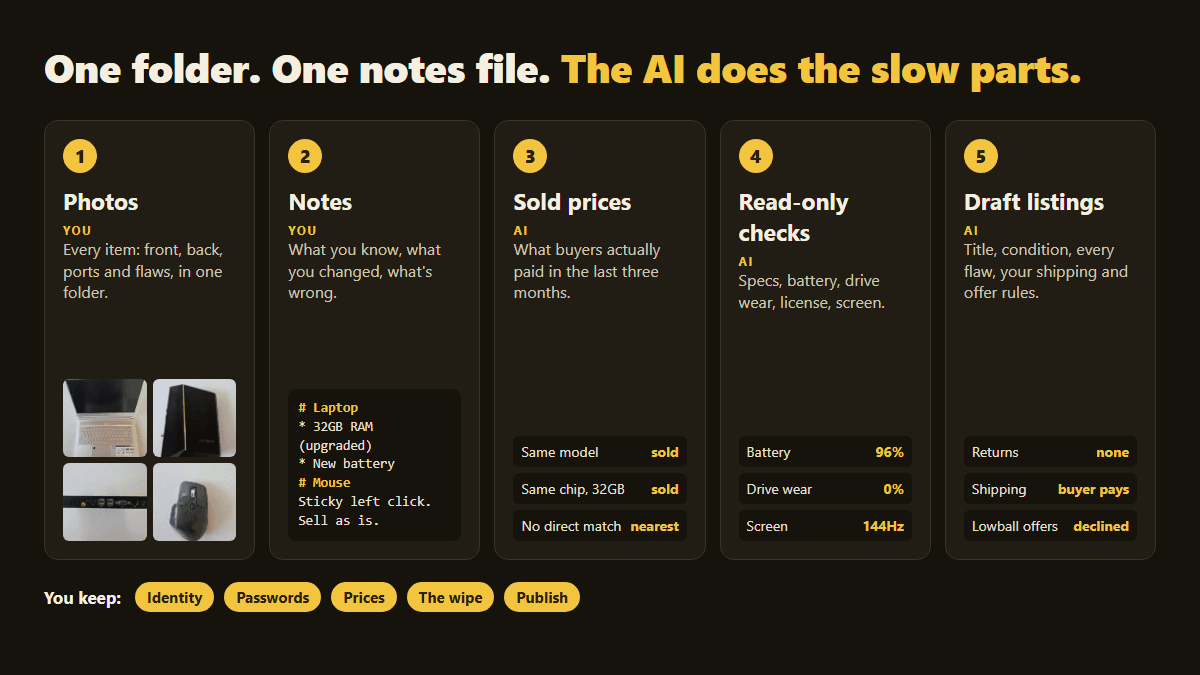
1. Put every photo in one folder
Photograph each item and name the files after it: laptop-1.jpg, laptop-2.jpg, modem-1.jpg. Shoot the front, the back, the ports and any flaw. Add one photo of the item powered on, if it powers on.
It's fine to photograph labels so the AI can read the model number. Keep serial numbers out of the listing photos, though.
2. Write down what you know in one notes file
Make one heading per item. Under each, list what you know, including what you've changed and what's wrong with it. Short notes are enough:
# Laptop (brand and model)
## Notes
* 32GB RAM (upgraded from 16GB). Price it as sold, with the upgrade.
* Battery and fan replaced.
## Images
"images/laptop-1.jpg"
"images/laptop-2.jpg"

# Wireless mouse
## Notes
Sticky left click. Sell as is.
## Images
"images/mouse-1.jpg"
The notes don't have to be right. The AI checks them, and mine were wrong in a few places.
3. Tell the AI how you want to sell
Say where you're selling and how you want each sale to go. Mine was eBay, the buyer pays shipping, no returns, no meetups and as little back-and-forth as possible. Mention anything that changes the price, like an upgrade you're not removing or a part that's the main selling point.
Here's a starting prompt you can copy:
I want to sell everything listed in items.md. The photos are in images/.
Research what comparable items actually SOLD for (not asking prices) and
recommend a price for each. I want this as easy as possible: eBay, buyer
pays shipping, no returns, no in-person meetups. Write a title, condition
and honest description for each, and list every flaw. Tell me anything
I need to do myself, and never enter passwords or personal details for me.
What did the AI do with it?
It did the slow parts of selling: market research, checking each machine and writing listings. It saved everything to the folder as it went: a listings file with prices and copy, a test report per machine and a ship-day checklist. Then it had every listing ready as a draft for me to review and publish.
Priced from sold listings, not asking prices
It looked up about three months of sold listings for each item. Asking prices only show what sellers hope for. Sold prices show what buyers paid.
It also handled the awkward cases:
- My upgraded laptop was compared with machines that had the same chip, graphics and 32GB of memory, not the base model.
- The mini PC had no sales under its brand at all, so it priced it against the closest equivalent with the same generation of processor.
Checked each machine, read-only
It logged in to each computer over my home network and ran read-only checks. It captured specs, battery health, drive wear, Windows activation and the screen's refresh rate. That turned "I think it's fine" into numbers I could put in a listing:
- One laptop's battery was at 96% of its original capacity, which backed up my "new battery" note.
- The other laptop's battery was at 100% after only 9 charge cycles.
- Both laptops' drives showed 0% wear.
Testing also caught what we'd gotten wrong, before a buyer could:
- The first laptop has a 144Hz screen, a feature buyers pay extra for. It wasn't in my notes, so it went into the title and the price went up.
- The second laptop's screen is 60Hz, not the 120Hz the first draft assumed.
- That laptop's built-in license is Windows 11 Home. It showed a business edition only because of a work subscription, which leaves with the wipe.
- My notes said the mini PC would ship with a Windows 11 installer. Its security chip is too old for Windows 11, so the listing says so instead.
It also confirmed the mini PC's onboard network port is dead. The listing discloses that and tells the buyer to bring a USB network adapter.
The cable modem needed a full reset. Its admin password wasn't the factory default, and the AI wouldn't guess it. So I pressed the reset button, and the AI confirmed the reset by logging in with the default password printed on the label. Then it ran a second factory reset from the modem's own settings page and recorded its firmware version for the listing.
Wrote and drafted the listings my way
Each listing got a searchable title, the item specifics buyers filter on, the right condition and an honest description. The broken mouse and the controller went up as "For parts or not working", the safest category for a known fault. Every draft got no returns, buyer-paid calculated shipping and a minimum offer, so lowball offers get declined automatically.
It caught small mistakes too. eBay's default package size put $11.30 of shipping on a $17.99 controller, so it entered the real weight and size instead.
What stays with you?
Every step that involves your identity, your accounts or a final decision stays with you. The AI did the research, the checks and the writing. It stopped every time a step needed something only I should provide, the same rule we hold to in the in-app AI helper we built for a client.
- Identity and payouts. eBay's seller setup asks for your legal name, address, phone and bank details. Enter those yourself.
- Passwords and access. I turned on remote login for each machine. The AI never guessed a password.
- Prices. I pushed back twice. I wanted $499 for my daily laptop, and it showed me the sold prices that said it would sit. It also cut $5 from the mini PC when I decided to keep its Wi-Fi adapter. I questioned that, and it agreed the cut wasn't justified and put the price back.
- The wipe and the publish button. Wiping each machine, publishing the listings and shipping are all mine.
What do people get wrong when selling old tech?
Most mistakes come after the sale, not before it. A buyer who can't use the item, or finds something you didn't mention, can open a claim even when you don't accept returns. These are the checks the AI flagged for me:
- "No returns" doesn't cover everything. eBay still lets a buyer claim an item was "not as described". Your protection is an exact description of every flaw, and test results help.
- Remove each device from its accounts before you wipe it. Sign out of your Microsoft or Apple account and remove the device. Take a work laptop out of your company's device management, and take a modem off your internet provider's account. Otherwise the next owner can get locked out.
- Wipe on ship day, not before. Keep using a machine until it sells, then wipe it the day it ships.
- Leave serial numbers out of the listing.
- Check the shipping cover against the item's value. A label's included cover may be well below what a laptop is worth.
Can you do this without remote access?
Yes. Remote login is the fastest way to test a computer, but it isn't the only way:
- Run a report script yourself. The AI can write a short script you run from a USB stick on each machine. It saves a text file of specs and health readings that you drop back into the folder.
- Share screenshots. Photos of the system information and battery screens tell the AI most of what it needs.
- Skip testing where it adds nothing. An accessory you know is unused, or one you're selling for parts, only needs honest notes.
Frequently Asked Questions
Can AI write my eBay listings?
Yes. Given photos and short notes, an AI agent can write searchable titles, choose the condition, fill in item specifics and describe every flaw. It can have every listing ready as a draft for you to review. Read each draft before you publish it, because you're the one answerable for what it says.
How does AI know what my used electronics are worth?
Ask it to research sold listings, not asking prices. Sold listings show what buyers paid for the same model recently. When an item has no direct sales, the AI can price it against the closest equivalent, such as another machine with the same processor. Then set a minimum offer to decline lowballs automatically.
Is it safe to let an AI log in to my old computers?
It can be, if you set the limits. Turn on remote access yourself, ask for read-only checks, and keep passwords and account details with you. In this project the AI read specs and health data, never guessed a password, and stopped at every identity step. Remove the access when you wipe the machine.
Do I need to test items before selling them used?
Not always, but it helps with anything electronic. Test results prove claims like battery health and catch mistakes before a buyer does. My testing found a sellable 144Hz screen and corrected three wrong assumptions before anything went live. For accessories that are unused or sold for parts, honest notes are enough.
If you'd like your team to hand real work to AI the same way, with people keeping the decisions, see how we approach AI readiness.
About the author: William Rodriguez is the founder of Analytical Ants. He helps teams put AI to work on real tasks, and he finally cleared his own shelf of old gear this way. More about Analytical Ants.